













Top 15 AI Automation Tools in 2026
Top 15 AI automation tools to streamline workflows, boost productivity, and scale your business with smarter, faster, and efficient solutions.
Your team is probably spending a significant chunk of every week on tasks that could be handled without human input. Approvals going back and forth over email. Data is being copied from one tool to another. Reports that someone builds by hand every Friday morning.
This is not a productivity problem. It is an automation problem.
In 2026, AI automation tools have matured to the point where even a small team can eliminate entire categories of repetitive work without hiring a developer or overhauling their tech stack. The tools are smarter, more accessible, and more tightly integrated with the software businesses already use.
This curated list covers 15 AI automation tools that are genuinely worth your attention in 2026. Each one is evaluated on what it does well, who it is built for, and how it performs in real business scenarios.
15 Powerful AI Automation Tools in 2026
1. Zapier AI
Zapier has been the go-to no-code automation platform for over a decade, and the addition of AI agents in recent versions makes it even more capable. You can build multi-step workflows that connect to over 7,000 apps, and the AI layer enables contextual decision-making within those flows.
Best For: Non-technical teams, marketers, and operations professionals who want automation without coding.
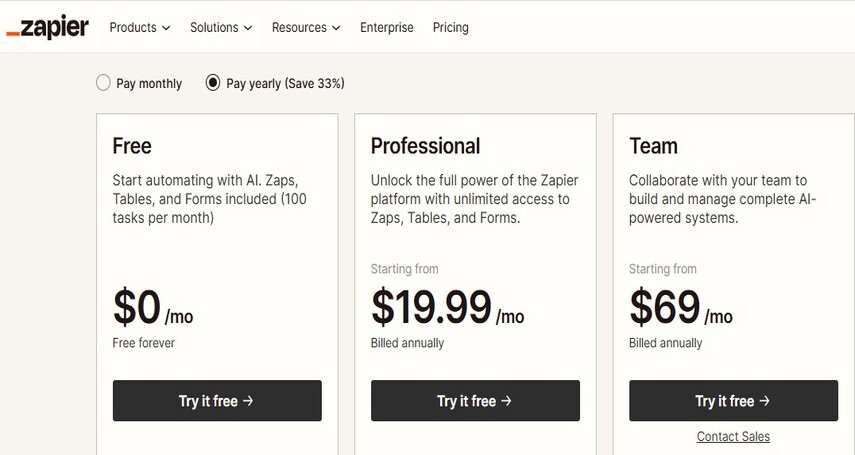
Pricing: Free plan available; paid plans start at $19.99/month.
How it works in practice: A SaaS company uses Zapier to pull new leads from their web form, run them through an AI step that scores and segments them, add them to HubSpot with tags, and trigger a Slack notification to the right sales rep.
2. Make (formerly Integromat)
Make sits between Zapier and developer-grade tools. Its visual scenario builder gives you genuine flexibility: complex branching, iterators, data aggregation, and better economics at scale. It handles over 1,000 app integrations and excels when workflows involve multiple conditions and transformations.
Best For: Ops teams, agencies, and mixed technical-nontechnical teams who need more logic than Zapier but do not want to write code.
Pricing: Free plan available; paid plans from $9/month.
How it works in practice: A content agency uses Make to monitor RSS feeds from client industries, pass articles through an AI summarizer, filter by relevance score, and automatically populate a Notion content calendar with draft briefs.
Businesses report up to 40% productivity improvement and employees save ~5.4% of work hours weekly using AI tools.
3. N8n
Among AI workflow automation tools, n8n is the one that technical teams tend to stick with long-term. It is open source, self-hostable, and deeply customizable. Its LangChain integration gives it nearly 70 AI-specific nodes, making it one of the most capable platforms for building AI-native workflows from scratch.
Best For: Developers, technical founders, and teams with data sovereignty requirements.
Pricing: Free self-hosted Community edition; cloud plans from $24/month.
How it works in practice: A fintech startup uses n8n to build a custom lead qualification agent. When a form submission arrives, n8n calls an LLM with the company's scoring criteria, enriches the lead via an external API, checks for CRM duplicates, and routes qualified leads to a dedicated sales pipeline.
4. UiPath
When people talk about Robotic Process Automation at enterprise scale, UiPath is almost always part of the conversation. It excels at automating desktop applications, legacy systems, and any workflow that involves clicking through software interfaces that have no API.
Best For: Enterprise teams dealing with legacy software, desktop-based processes, or compliance-heavy workflows.
Pricing: Community edition is free; enterprise pricing is based on scale.
How it works in practice: A regional healthcare network uses UiPath to extract patient data from an older scheduling application that cannot integrate with modern APIs. The UiPath robot reads the screen, pulls appointment data, and syncs it with their CRM.
5. Microsoft Power Automate
If your organization runs on Microsoft 365, Power Automate is likely the lowest-friction path to automation. It integrates deeply with Teams, SharePoint, Outlook, Dynamics, and the rest of the Microsoft stack. Copilot integration now lets users describe workflows in plain language and get suggestions automatically.
Best For: Enterprises and mid-market teams already invested in the Microsoft ecosystem.
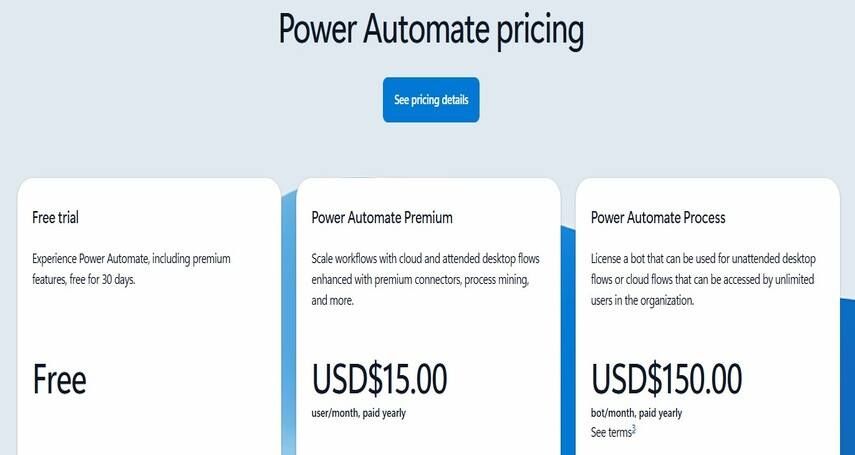
Pricing: Starts at $15/month for the Premium plan.
How it works in practice: A professional services firm uses Power Automate to trigger a contract approval workflow whenever a new proposal is finalized in SharePoint. The workflow routes the document through three approval stages in Teams, logs decisions in Dynamics CRM, and sends the client a confirmation email when all parties sign off.
6. Lindy AI
Lindy is one of the newer entrants that takes an agent-first approach. Rather than building traditional workflow steps, you create AI agents that can reason, recall context across sessions, and take initiative. It is particularly strong for email management, meeting prep, and sales workflows.
Best For: Sales teams, founders, and knowledge workers who want an autonomous assistant rather than a rule-based workflow.
Pricing: Free tier available; paid plans scale with usage.
How it works in practice: A founder running a boutique consultancy set up a Lindy agent to manage their inbox. The agent reads incoming emails, categorizes them, drafts context-aware replies for routine inquiries, flags high-priority messages, and schedules follow-up reminders.
7. Workato
Workato is the iPaaS platform of choice for enterprises that need to connect complex systems, including automation in ERP and CRM, along with HRIS and custom databases, while providing governance features, audit logs, and compliance controls that enterprise IT teams require.
Best For: CIOs, CTOs, and enterprise integration teams managing large-scale system orchestration.
Pricing: Pricing available on request; typically $10K+ annually for enterprise.
How it works in practice: A manufacturing company uses Workato to sync orders between its SAP ERP system and a third-party logistics provider's platform. When an order is updated in SAP, Workato orchestrates a chain of API calls, validates shipping windows, and sends automated status updates to the client portal.
8. Automation Anywhere
Automation Anywhere combines RPA with AI process intelligence and cloud-native architecture. Its Automation Co-Pilot feature embeds AI assistance directly into employee workflows, providing suggestions and automating steps within applications like Salesforce or ServiceNow without requiring the user to leave their current screen.
Best For: Large enterprises looking for a full-suite automation platform with AI-embedded process support.
Pricing: Enterprise pricing based on usage; free community edition available.
How it works in practice: A global insurance company uses Automation Anywhere to handle claims processing. When a claim is submitted, the Co-Pilot reads the document, extracts key fields, compares against policy data in Salesforce, flags anomalies, and pre-fills the adjuster's form.
9. ClickUp Brain
ClickUp Brain brings AI automation solutions into project and task management. It can summarize updates, generate task descriptions, auto-fill status reports, and trigger automations based on project activity. If your team already lives inside ClickUp, the AI layer becomes a natural extension of how work gets tracked.
Best For: Project managers, product teams, and agencies managing complex workflows inside ClickUp.
Pricing: Included in ClickUp plans; ClickUp AI available from $7/month per user.
How it works in practice: A product team uses ClickUp Brain to auto-generate sprint summaries every Friday. The AI pulls completed tasks, identifies blockers, summarizes team velocity, and posts the report to Slack.
10. Notion AI
Notion AI sits inside the workspace rather than functioning as a separate tool. It helps with writing, summarizing, and searching across your entire Notion environment. Its recent automation capabilities allow recurring workflows to run inside documents and databases, making it a practical choice for teams that organize their operations in Notion.
Best For: Knowledge workers, content teams, and companies that run operations inside Notion.
Pricing: Included with Notion Plus and above; AI add-on starts at $8/month.
How it works in practice: A marketing team uses Notion AI to maintain their content library. When a new article is drafted, AI automatically extracts keywords, generates a summary, suggests internal links, and updates the status database.
11. Fireflies AI
Fireflies specializes in meeting intelligence. It records, transcribes, and analyzes calls across Zoom, Google Meet, and Teams. Beyond transcription, it extracts action items, tracks discussion topics, and can trigger downstream automations like creating tasks in Asana or updating a CRM deal based on meeting content.
Best For: Sales teams, customer success managers, and companies running high volumes of client calls.
Pricing: Free plan available; paid plans from $10/month per user.
How it works in practice: A B2B software company integrated Fireflies with HubSpot so that every discovery call automatically generates a deal update, logs key questions asked, and creates follow-up tasks for the account executive.
12. LangChain with LangFlow
LangChain is a developer framework for building LLM-powered applications. LangFlow adds a drag-and-drop visual interface on top of it, making it accessible to teams that want to prototype agent pipelines without writing raw Python. Together, they are the foundation for custom AI workflows that go beyond what prebuilt platforms can offer.
Best For: Technical teams building custom AI agents, internal copilots, or complex reasoning pipelines.
Pricing: Open source; LangFlow Cloud plans available.
How it works in practice: An e-commerce company built a customer service agent using LangChain. The agent reads incoming support tickets, queries product documentation via vector search, checks order status through an API call, and generates a personalized response.
13. Relevance AI
Relevance AI focuses on building AI agents for business workflows without requiring deep technical expertise. It has a strong emphasis on enterprise use cases like sales outreach, support triage, and research automation. Teams can build multi-step agents using templates or from scratch with its visual builder.
Best For: Sales, marketing, and operations teams building AI agents for specific business processes.
Pricing: Free tier available; paid plans from $19/month.
How it works in practice: A recruitment firm uses Relevance AI to build a sourcing agent. The agent searches LinkedIn profiles, scores candidates against job requirements, drafts personalized outreach emails, and logs activity in the ATS. The team fills roles faster with less manual screening.
14. Pipedream
Pipedream is a developer-first automation platform that blends visual workflow building with code steps in JavaScript, Python, Go, and Bash. It supports 2,700+ integrations and a serverless runtime, making it ideal for backend automation triggered by APIs, webhooks, or scheduled events.
Best For: Developers and technical ops teams who want the speed of no-code combined with code flexibility.
Pricing: Free tier available; paid plans from $29/month.
How it works in practice: A developer-led startup uses Pipedream to handle webhook events from their payment processor. When a payment fails, Pipedream calls an AI step to assess the failure type, triggers a customized retry sequence, notifies the customer via a personalized email, and logs the event with enriched context in their data warehouse.
15. HubSpot AI (Breeze)
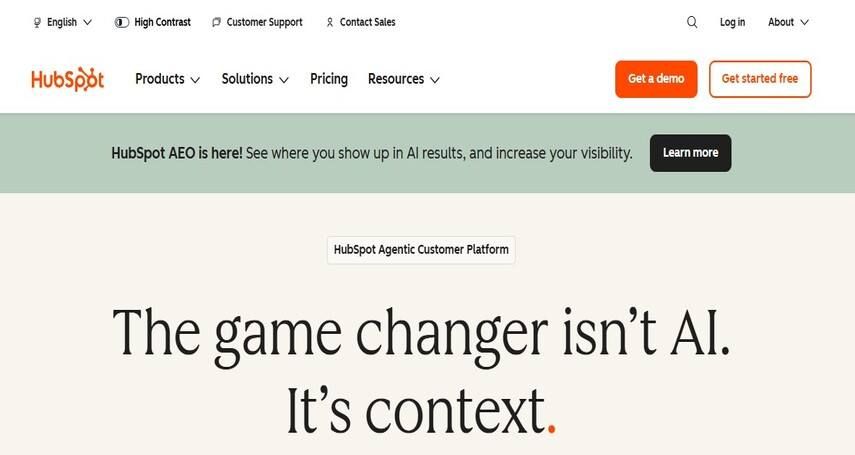
HubSpot's Breeze AI is embedded throughout the CRM and marketing platform. It automates email sequences, scores leads, suggests next actions for sales reps, and generates content for campaigns. For teams where CRM is the center of operations, having AI built into that system removes a lot of the context-switching that external tools require.
Best For: Marketing, sales, and customer success teams already using HubSpot.
Pricing: Included in HubSpot's paid plans; scales with CRM tier.
How it works in practice: A SaaS company uses HubSpot Breeze to automatically score and route leads based on behavioral data. High-intent leads get an immediate follow-up sequence triggered, while lower-priority leads enter a nurture track.
Quick Overview: Which Tool Fits Your Team?
|
Tool |
Technical level |
Best Use Case |
|
Zapier AI |
Low |
Cross-App Workflows |
|
Make |
Low-medium |
Complex multi-step workflows |
|
n8n |
High |
Custom Workflows |
|
UiPath |
High |
Enterprise RPA |
|
Power Automate |
Medium |
Microsoft ecosystem |
|
Lindy AI |
Low |
Email & sales agents |
|
Workato |
High |
Enterprise iPaaS |
|
Automation Anywhere |
High |
Large Scale RPA |
|
ClickUp Brain |
Low |
Project Automation |
|
Notion AI |
Low |
Knowledge & Docs |
|
Fireflies AI |
Low |
Meeting Intelligence |
|
LangChain & Flow |
High |
Custom AI Agents |
|
Relevance AI |
Medium |
Business process agents |
|
Pipedream |
High |
Backend API automation |
|
Hubspot Breeze |
Low-Medium |
CRM & Marketing AI |
How to Choose the Right AI Automation Tool for Your Business
With 15 options in front of you, the decision comes down to four questions.
1. How technical is your team? Non-technical teams should start with Zapier, Make, or HubSpot Breeze. Developer-heavy teams will get more mileage from n8n, Pipedream, or LangChain.
2. How complex are your workflows? Simple linear triggers work fine in Zapier. Multi-branch logic with data transformation belongs in Make or n8n. Complex enterprise orchestration needs Workato or Power Automate.
3. Do you need AI reasoning or just automation? If you need a system that can handle ambiguity and make decisions, look at Lindy, Relevance AI, or LangChain-based agents rather than rule-based platforms.
4. What is your current tech stack? The best automation tool is often the one that connects to everything you already use with the least friction.
Backed by 10+ years of enterprise AI delivery experience and having served globally across companies of all sizes, at Rubixe, we’ve implemented AI automation across multiple businesses by identifying the right use cases, mapping exact workflow requirements, and selecting tools that fit their existing systems. The focus is always on practical outcomes, reducing manual effort and improving operational efficiency. See how our AI automation solutions work for your business.
See how our AI automation solutions work: https://rubixe.com/services/ai-automation
Frequently Asked Questions
1. What is the difference between AI automation and traditional automation?
AI automation adds context and decision-making, unlike traditional automation’s rigid if-then rules, enabling workflows that adapt to varying paths and exceptions.
2. Which AI automation tool is best for small businesses?
Zapier and Make are ideal for their no-code setup and free tiers, while HubSpot Breeze suits sales-focused teams.
3. Can I use multiple AI automation tools together?
Yes. Many teams combine Zapier or Make for integrations, UiPath for legacy systems, and AI agents for specific workflows.
4. What is the best AI automation tool for someone with no coding experience?
Zapier is the most beginner-friendly, with 7,000+ integrations, a simple setup, and ready-to-use templates.
Ready to Integrate AI Automation to Work in Your Business?
At Rubixe, we help businesses identify the right automation opportunities, select the right tools, and implement workflows that actually stick. Whether you are just starting or looking to scale what you have already built, we can help you get there faster.
Schedule a free consultation with our AI experts to identify where AI automation can improve your workflows, reduce manual effort, and increase productivity across your organization.