










What Is AI Workflow Automation? How Does It Work?
Understand what AI workflow automation is, how it works, and how businesses use it to streamline processes, reduce manual tasks, and improve efficiency.
Organizations are under constant pressure to deliver faster outcomes with fewer resources while maintaining accuracy and consistency. Manual workflows slow execution, introduce variability, and limit scalability. AI workflow automation addresses these challenges by enabling systems to understand data, make decisions, and execute processes with minimal human intervention.
Modern AI automation solutions combine artificial intelligence, machine learning, and process orchestration to transform how work gets done across departments. Instead of automating single tasks, AI-driven systems coordinate entire workflows, adapt to changing conditions, and improve continuously through learning.
Let’s delve into a practical understanding of AI workflow automation, including how it functions, where it delivers value, implementation steps, common obstacles, and current developments shaping its adoption.
What Is AI Workflow Automation
AI workflow automation means using artificial intelligence to run business processes automatically with minimal human effort. Instead of following fixed rules like traditional automation, AI can understand data, learn from patterns, and make decisions when situations change.
In simple terms, it takes routine tasks that people usually handle, such as sorting emails, processing documents, approving requests, or responding to customers, and lets smart systems handle them faster and more accurately.
An AI-powered workflow typically receives information, understands what it means, decides what should happen next, completes the task across different systems, and tracks the result. Because the system learns over time, it becomes more efficient and reliable.
Businesses use AI automation solutions to save time, reduce mistakes, lower costs, and allow employees to focus on important work that needs human thinking and creativity.
How AI Workflow Automation Works
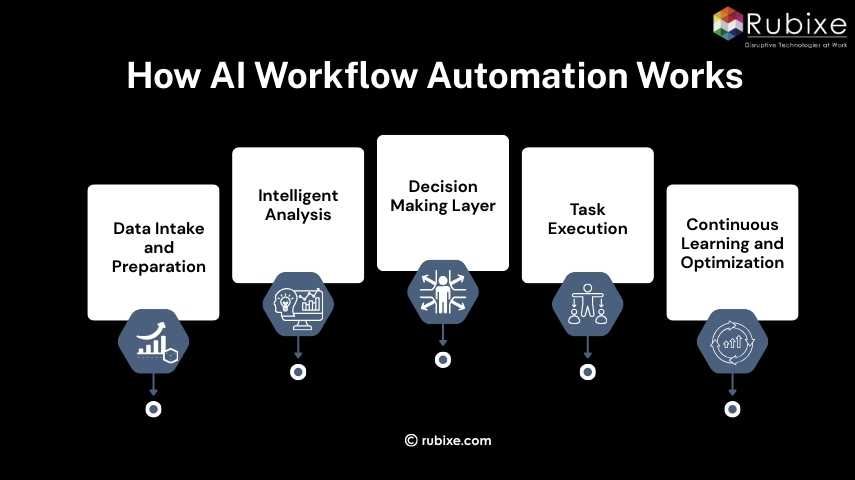
AI workflow automation operates as a coordinated system rather than a single tool. It combines data pipelines, machine learning models, decision engines, and execution mechanisms to manage end-to-end processes.
-
Data Intake and Preparation
Every AI-driven workflow begins with data. Inputs may come from structured systems such as CRM or ERP platforms, as well as unstructured sources like emails, PDFs, chat conversations, or images. Data engineering processes clean, standardize, and organize this information so it can be analyzed effectively.
For example, an automated accounts payable workflow may ingest supplier invoices from email attachments, scanned documents, and digital submissions. Optical character recognition extracts text, while validation rules ensure completeness.
-
Intelligent Analysis
Once prepared, data is processed by AI models trained to recognize patterns and relationships. Machine learning algorithms classify information, detect anomalies, forecast outcomes, or interpret language depending on the application.
In customer service automation, natural language processing models analyse incoming messages to determine intent, urgency, and sentiment. In supply chain management, predictive models estimate future demand based on historical sales, seasonality, and external factors.
-
Decision-Making Layer
After analysis, a decision engine determines the appropriate action. This layer replaces routine human judgment by applying learned patterns and business policies. Decisions may include approvals, routing tasks to specific teams, triggering alerts, or initiating additional processes.
Risk thresholds and escalation rules ensure that complex or high-impact cases receive human review when necessary.
-
Task Execution
Automation tools then perform the required actions across digital systems. These actions might involve updating records, sending communications, generating documents, scheduling activities, or integrating with third-party platforms.
Robotic Process Automation often handles repetitive interactions with legacy applications that lack modern interfaces.
-
Continuous Learning and Optimization
Performance data feeds back into the system, enabling ongoing improvement. If outcomes deviate from expectations, models can be retrained or workflows adjusted. Over time, the system becomes more accurate, efficient, and responsive to real-world conditions.
This continuous improvement cycle distinguishes AI workflow automation from static automation approaches.
Use Cases of AI Automation in Business
AI workflow automation delivers value across industries because most organizations rely on processes that involve repetitive decisions and high data volumes.
In customer support, AI systems triage incoming requests, resolve common issues automatically, and route complex cases to specialists. Response times drop significantly while service quality becomes more consistent.
Finance departments use AI to process invoices, reconcile transactions, monitor compliance, and detect fraudulent activity. Automated workflows reduce manual data entry and accelerate reporting cycles.
Human resources teams deploy AI to screen resumes, coordinate interviews, onboard employees, and analyse workforce trends. Administrative workload decreases, allowing HR professionals to focus on talent development and organizational culture.
Sales and marketing functions benefit from intelligent lead scoring, campaign optimization, and personalized outreach. AI analyses behavioural data to identify prospects most likely to convert, improving revenue efficiency.
Operations and supply chain management gain predictive insights into demand fluctuations, inventory needs, equipment maintenance, and logistics planning. This reduces stockouts, excess inventory, and unplanned downtime.
Across these use cases, organizations implementing AI automation solutions report improvements in productivity, decision quality, and customer experience.
How to Implement AI in Workflow: Step-by-Step Guide
Implementing AI in workflows does not have to be complex. When approached in a practical, structured way, organizations can introduce AI automation solutions smoothly and start seeing real improvements in efficiency, accuracy, and speed.
Step 1: Choose One Process That Needs Improvement
Start small. Identify a workflow that consumes too much time, involves repetitive tasks, or frequently results in errors. The best starting point is a process that employees perform daily and that directly affects productivity or customer experience.
Examples include handling customer inquiries, processing invoices, screening leads, or managing routine approvals. Focusing on a single use case reduces risk and makes results easier to measure.
Step 2: Define What You Want to Achieve
Be clear about the outcome you expect. Without a defined goal, it becomes difficult to judge whether the implementation is successful.
Your objective might be to reduce processing time, cut operational costs, improve accuracy, respond to customers faster, or handle higher workloads without increasing staff. Setting measurable targets keeps the project aligned with business priorities.
Step 3: Prepare and Organize Your Data
AI systems learn from existing data. Gather the information related to the chosen workflow and ensure it is accurate, complete, and accessible. This may include historical records, documents, emails, transaction logs, or customer interactions.
If the data is scattered or inconsistent, clean and organize it first. Good data quality directly determines how reliable the AI system will be.
Step 4: Select and Implement the Right AI Tool
Choose a solution that fits your specific needs and integrates with your current systems. Some tools specialize in document processing, others in customer communication, forecasting, or task automation.
Begin with a pilot implementation instead of a full rollout. Test the system on real tasks while keeping human supervision in place. This allows adjustments before scaling across the organization.
Step 5: Monitor Results and Improve Continuously
After deployment, track how the workflow performs compared to your original goals. Measure factors such as time saved, error reduction, cost efficiency, and user satisfaction.
AI systems improve over time as they process more data. Regular monitoring helps identify areas for refinement and ensures the solution continues delivering value as business needs evolve.
By following these five clear steps, organizations can introduce AI automation solutions in a controlled, practical way without disrupting operations. Starting small, focusing on real problems, and improving continuously leads to sustainable success and prepares the business for broader AI adoption in the future.
Challenges of AI Workflow Automation
Despite its advantages, implementing AI-driven workflows presents several practical challenges.
Data limitations often represent the biggest obstacle. Incomplete, biased, or inconsistent data can undermine model performance and produce unreliable outcomes. Establishing strong data governance practices is essential.
Integration with legacy infrastructure may require additional development effort. Older systems may lack modern interfaces, complicating connectivity.
Organizational change management also plays a major role. Employees may feel uncertain about new technologies or altered job responsibilities. Transparent communication, training programs, and involvement in design decisions help build acceptance.
Security and regulatory compliance must be addressed, particularly when workflows handle sensitive information. Robust access controls, encryption, and auditing mechanisms are necessary.
Initial investment in technology and expertise can be substantial. However, long-term operational savings and productivity gains typically offset these costs.
Partnering with an experienced AI implementation provider can significantly reduce these risks by ensuring proper data preparation, system integration, and secure deployment from the outset. Rubixe helps organizations navigate these complexities with tailored AI solutions, enabling faster adoption and reliable business outcomes.
Latest Advancements in AI Automation
AI workflow automation continues to evolve rapidly as new capabilities emerge.
Generative AI now supports content creation, report drafting, knowledge management, and conversational interfaces. This expands automation into areas previously considered too complex for machines.
Intelligent document processing enables accurate extraction of information from complex forms, contracts, and handwritten materials. This capability is transforming industries reliant on paperwork.
Hyperautomation initiatives combine AI, process mining, analytics, and automation tools to streamline entire value chains rather than isolated tasks. Organizations gain end-to-end visibility and optimization.
Predictive and prescriptive analytics allow systems to anticipate future events and recommend optimal actions. Businesses can respond proactively instead of reactively.
In advanced deployments, autonomous operations manage processes with minimal human supervision, adjusting strategies in real time based on performance feedback.
How AI Workflow Automation Drives Smarter Business Operations
AI workflow automation represents a fundamental shift in how organizations operate. By embedding intelligence into processes, businesses can execute work faster, more accurately, and at a greater scale than manual approaches allow.
Adopting AI automation solutions requires thoughtful planning, reliable data, and alignment with strategic objectives. When implemented effectively, the result is a more agile organization capable of responding quickly to market demands while maintaining operational excellence.
Companies seeking to modernize workflows and unlock measurable efficiency gains can benefit from experienced guidance. Rubixe supports organizations in deploying practical AI solutions tailored to real business challenges, helping teams move from experimentation to tangible results.