


















RPA vs IPA: Choosing the Right Automation Approach for Businesses
Understand the differences between RPA and IPA, their applications, and how to choose the right automation approach for your business processes.
Many organizations begin automation with a simple objective: reduce manual effort in repetitive work. During this process, teams often evaluate RPA vs IPA to determine which automation technology fits their operations.
Both approaches improve efficiency, yet they operate at different levels of process complexity. Robotic Process Automation focuses on rule-based tasks that follow predictable steps. Intelligent Process Automation expands automation by combining artificial intelligence with workflow automation to handle more complex processes.
Understanding the practical differences between RPA vs IPA helps business leaders select an automation strategy that aligns with their process structure, data type, and operational goals.
What Is RPA (Robotic Process Automation)
Robotic Process Automation uses software bots to perform repetitive tasks within digital systems. The bots replicate actions that employees perform on applications, such as entering data, transferring information between systems, or generating reports.
Companies implement robotic process automation solutions to improve efficiency in structured processes that follow predefined rules. Since the bots interact with user interfaces, organizations often deploy RPA without replacing existing software systems.
Common characteristics of RPA include:
-
Execution of rule-based tasks
-
Interaction with multiple software platforms
-
High processing speed for repetitive activities
-
Reduction of manual data entry errors
For example, a finance team may use RPA to process vendor invoices. The bot collects invoice information, enters it into the accounting system, and updates payment records. In human resources, RPA can transfer employee information from recruitment systems into internal databases during onboarding.
What Is IPA (Intelligent Process Automation)
Intelligent Process Automation extends traditional automation by combining RPA with artificial intelligence technologies. The system analyzes information, interprets documents, and supports decision-making in workflows that contain complex data inputs.
Organizations adopt intelligent process automation solutions when processes involve large volumes of documents, text data, or analytical steps that require contextual understanding.
The key components of IPA typically include:
-
Machine learning models for pattern recognition
-
Natural language processing for interpreting text
-
Optical character recognition for extracting data from documents
-
Data analytics for evaluating information and identifying trends
For instance, in insurance operations, IPA systems can review claim documents, extract key details, verify policy information, and classify claims for further processing. In banking, IPA can assist with loan application analysis by reviewing financial documents and identifying potential risk indicators.
These capabilities enable businesses to automate processes that previously required manual analysis.
Why Businesses Compare RPA vs IPA
Automation projects usually start with identifying tasks that consume time and create operational bottlenecks. Finance teams process invoices daily, HR teams manage employee records, and customer support teams handle large volumes of service requests. Many of these tasks involve repetitive actions that software systems can execute faster.
However, some workflows include document analysis, pattern recognition, or decision-based steps. In such situations, basic automation may not deliver the expected outcomes.
This situation explains why organizations analyse RPA vs IPA before investing in automation technology. A clear understanding of process requirements allows companies to apply the right automation model instead of relying on trial and error.
RPA vs IPA: Key Differences
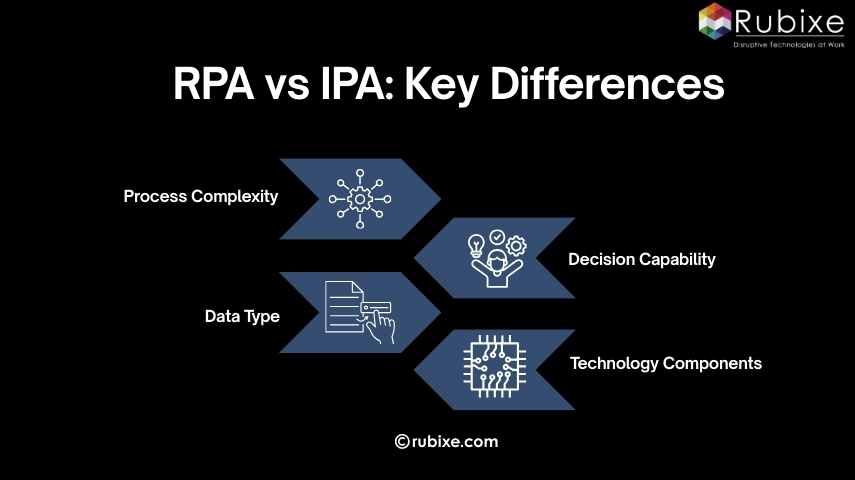 When evaluating RPA vs IPA, organizations should consider the structure of their processes and the type of data involved.
1. Process Complexity
RPA focuses on straightforward workflows with fixed rules. IPA handles multi-step processes that involve analysis or contextual interpretation.
2. Data Type
RPA primarily works with structured data stored in databases or spreadsheets. IPA processes both structured and unstructured data, including emails, images, and scanned documents.
3. Decision Capability
RPA executes predefined instructions without interpreting context. IPA systems analyze information and support decisions using AI models.
4. Technology Components
RPA relies on automation scripts and workflow rules. IPA combines automation with artificial intelligence technologies such as machine learning and natural language processing.
|
Feature |
RPA (Robotic Process Automation) |
IPA (Intelligent Process Automation) |
|
Automation Type |
Rule-based task automation |
Intelligent process automation |
|
Data Handling |
Works mainly with structured data |
Processes both structured and unstructured data |
|
Decision Capability |
Executes predefined rules |
Uses AI models to support analysis and decision-making |
|
Technologies Used |
Software bots and workflow automation |
RPA combined with machine learning, NLP, and analytics |
|
Process Complexity |
Suitable for repetitive and predictable tasks |
Designed for complex workflows involving analysis |
|
Implementation Scope |
Automates individual tasks |
Automates end-to-end business processes |
|
Common Use Cases |
Data entry, invoice processing, report generation |
Document processing, fraud detection, and claim analysis |
Business Use Cases of RPA and IPA
1. RPA Use Cases
RPA works well for tasks that involve repetitive actions and structured data. Common examples include:
-
Invoice data entry in finance systems
-
Payroll processing in human resource departments
-
Data migration between enterprise applications
-
Automated generation of operational reports
-
Order processing in e-commerce platforms
These processes follow clear instructions and produce predictable outcomes.
2. IPA Use Cases
IPA supports workflows that require the interpretation of documents or the analysis of multiple data sources. Examples include:
-
Intelligent document processing for insurance claims
-
Customer service request classification
-
Fraud detection in financial transactions
-
Loan evaluation in banking operations
-
Predictive maintenance analysis in manufacturing systems
Many organizations adopt IPA to automate document-heavy workflows and improve decision support. Understanding how IPA helps businesses can clarify where this technology delivers the most operational value.
Benefits and Implementation Considerations
Both automation technologies provide operational advantages, yet businesses should evaluate implementation factors carefully when deciding between RPA vs IPA.
Benefits of RPA
RPA delivers quick improvements in productivity and accuracy.
Key advantages include:
-
Faster execution of repetitive tasks
-
Reduction of manual data entry errors
-
Lower operational costs
-
Integration with existing software systems
These benefits make RPA suitable for departments that manage high-volume administrative work.
Benefits of IPA
IPA expands automation capabilities to more complex processes.
Organizations benefit from:
-
Automation of document-heavy workflows
-
Improved data analysis capabilities
-
Faster processing of information from multiple sources
-
Support for decision-based processes
Implementation Considerations
Before adopting automation, organizations should evaluate several practical factors:
-
Process structure and workflow complexity
-
Type and quality of data involved
-
Integration requirements with enterprise systems
-
Availability of technical expertise for managing automation tools
Limitations of RPA and IPA
Understanding the limitations of each technology helps organizations make better decisions when comparing RPA vs IPA.
Limitations of RPA
RPA performs best in processes that follow fixed rules and structured data formats. When workflows change frequently or involve unpredictable inputs, maintaining automation scripts can become difficult.
Some common limitations include:
-
Difficulty handling unstructured data, such as emails or scanned documents
-
Dependence on stable user interfaces and system layouts
-
Limited ability to interpret context or make analytical decisions
-
Additional configuration is required when business processes change
Because of these constraints, RPA is most effective in stable environments where workflows remain consistent.
Limitations of IPA
IPA provides advanced automation capabilities, yet implementation often requires greater planning and technical resources.
Organizations may encounter challenges such as:
-
Higher implementation complexity compared to task-based automation
-
Dependence on high-quality data for training AI models
-
Greater infrastructure and integration requirements
-
Need for specialized expertise in machine learning or analytics
Despite these challenges, IPA delivers strong value in processes that require document interpretation, pattern recognition, or decision support.
Evaluating both the advantages and limitations of RPA vs IPA helps organizations choose the automation approach that aligns with their operational requirements.
Choosing the Right Automation Approach
Selecting between RPA vs IPA depends on how business processes operate, the type of data involved, and the level of analysis required during the workflow. Evaluating these factors helps organizations choose the automation approach that fits their operational needs.
Choose RPA when:
-
Processes follow fixed and repetitive steps
-
Data is structured, such as spreadsheets or databases
-
Tasks involve data entry, data transfer, or report generation
-
The goal is to reduce manual workload in routine operations
-
Processes require fast implementation with minimal system changes
Common examples include invoice processing, payroll updates, and automated report generation.
Choose IPA when:
-
Processes involve documents, emails, or varied data inputs
-
Workflows require data interpretation or analysis
-
Decisions must be made based on patterns or extracted information
-
Processes include multiple conditions or decision points
-
Automation needs to handle complex, multi-step workflows.
Choose IPA when:
-
Processes involve documents, emails, or varied data inputs
-
Workflows require data interpretation or analysis
-
Decisions must be made based on patterns or extracted information
-
Processes include multiple conditions or decision points
-
Automation needs to handle complex, multi-step workflows
Examples include document processing in insurance claims, loan application evaluation in banking, and customer request classification in service operations.
Evaluating process structure, data format, and decision requirements helps organizations determine whether RPA or IPA will deliver the most effective automation outcomes.
Automation Strategies for Business Growth
Organizations planning automation initiatives should begin by mapping their existing processes and identifying tasks that consume time and resources. This evaluation helps determine whether basic task automation or intelligent process automation will provide greater operational value.
A structured automation strategy begins with understanding business processes and selecting technologies that align with operational goals. Organizations that approach automation with a clear roadmap often achieve better efficiency and long-term scalability. Companies exploring automation solutions often work with technology partners such as Rubixe to evaluate processes and implement practical automation solutions.