










AI Automation: Use Cases, Implementation, Costs and ROI
Learn how AI automation works, explore business use cases, implementation steps, costs, ROI, and risks to build smarter business workflows.
AI automation combines artificial intelligence with connected business workflows to interpret information, generate outputs, and carry out permitted actions. It can help classify customer requests, extract invoice details, prepare reports, and route work between systems. Clear rules determine which actions happen automatically and which require human approval.
For businesses, the starting point is a process with a clear purpose, usable data, and an outcome worth improving. This guide explains how to choose that process, implement automation, manage the risks, and calculate the return.
What AI Automation Does
AI adds interpretation to an automated process. A model can read an incoming email, identify its subject, extract relevant information, and suggest a response. The surrounding workflow checks that output and determines the next action.
Different technologies handle different tasks:
-
Machine learning: Predictions, classifications, and anomaly detection.
-
Natural language processing: Information extraction and text classification.
-
Generative AI: Drafts, summaries, and other generated content.
-
Computer vision: Image interpretation and visual inspection.
-
Document processing: Extracting and organizing information from business documents.
These technologies can work together. An invoice workflow might extract fields from a document, check them against a purchase order, and route discrepancies to an accounts payable employee.
A prediction or summary becomes part of automation when it connects to a defined next step.
Benefits of AI Automation for Businesses
The benefits of AI automation depend on the task, data, and implementation. Useful outcomes include:
-
Less manual preparation: Reduced effort copying information, sorting requests, or assembling reports.
-
Shorter delays: Work reaches the appropriate person or system sooner.
-
Better handling of varied inputs: Emails, documents, and images can enter structured workflows.
-
Earlier issue detection: Unusual transactions or operating patterns can trigger review.
-
Clearer tracking: Recorded actions make it easier to investigate delays and corrections.
Measure the whole process. Faster data extraction offers limited benefit when every document still waits several days for approval.
AI Automation vs Traditional Automation, RPA, and AI Agents
These approaches overlap, and a business workflow may combine several of them.
|
Approach |
How it works |
Typical fit |
Main consideration |
|
Traditional automation |
Executes predefined rules and integrations |
Stable tasks with clear conditions |
Exceptions need defined handling |
|
Robotic process automation (RPA) |
Repeats interactions with software interfaces |
Routine screen-based work |
Interface changes can require maintenance |
|
AI automation |
Uses model outputs within a controlled workflow |
Classification, extraction, and prediction |
Outputs need validation |
|
Agentic automation |
Uses AI to select steps or tools toward a goal |
Tasks with varying routes to completion |
Actions need boundaries and monitoring |
Robotic process automation can also connect with document processing and AI. It is therefore useful to distinguish a rules-based task from the wider capabilities of the platform running it.
AI agents can form part of an automation system. Their ability to select steps adds flexibility, while the organization still defines permissions and approval requirements.
Use rules for clearly specified conditions and AI where interpretation adds value. Handling varied inputs also differs from learning automatically after deployment; performance still needs checking as inputs change.
How AI Automation Works
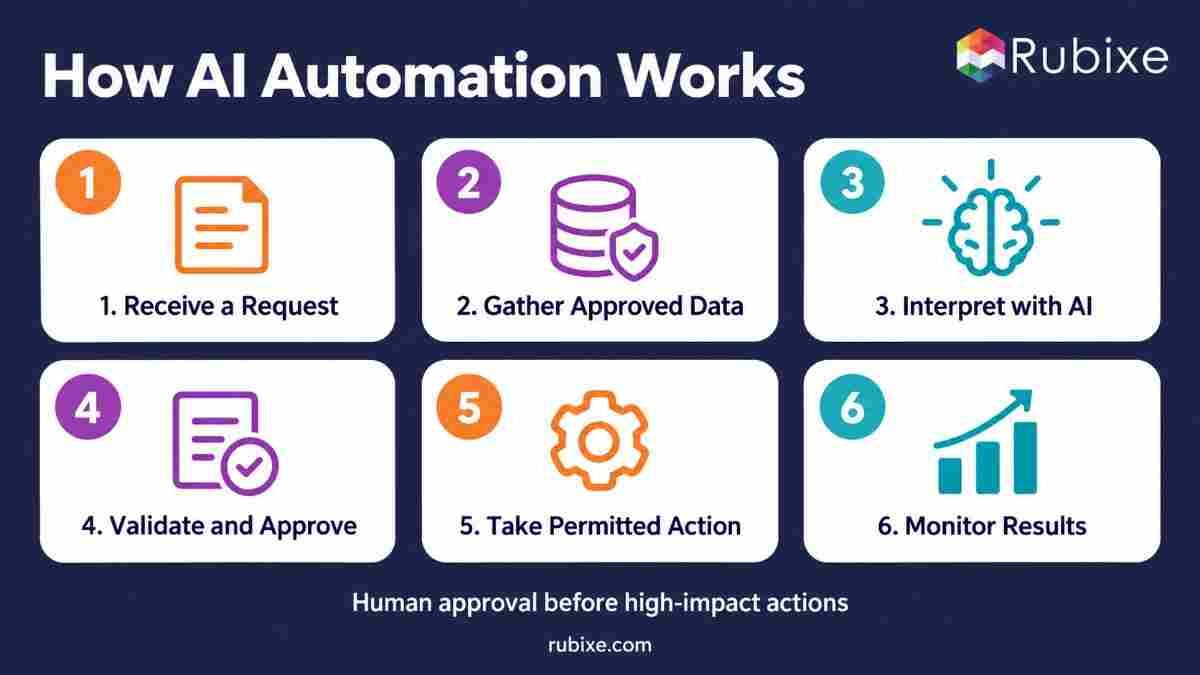
A controlled workflow follows a sequence like this:
-
Trigger: A new ticket, form submission, or document starts the process.
-
Gather: The system retrieves approved information from connected applications.
-
Interpret: AI classifies, predicts, extracts, or generates the required output.
-
Validate: Rules check completeness, permitted values, and relevant risks.
-
Review: Cases requiring approval go to a person before execution.
-
Act: The workflow performs the permitted action.
-
Monitor: Logs capture outcomes, errors, costs, and recovery activity.
Routine cases may proceed automatically when policy and testing support that decision. Sensitive cases can follow a separate approval route.
The integration layer connects these steps. Integrating AI automation with CRM and ERP also requires handling failed requests, duplicate updates, and differences between records.
How to Choose Processes for AI Automation
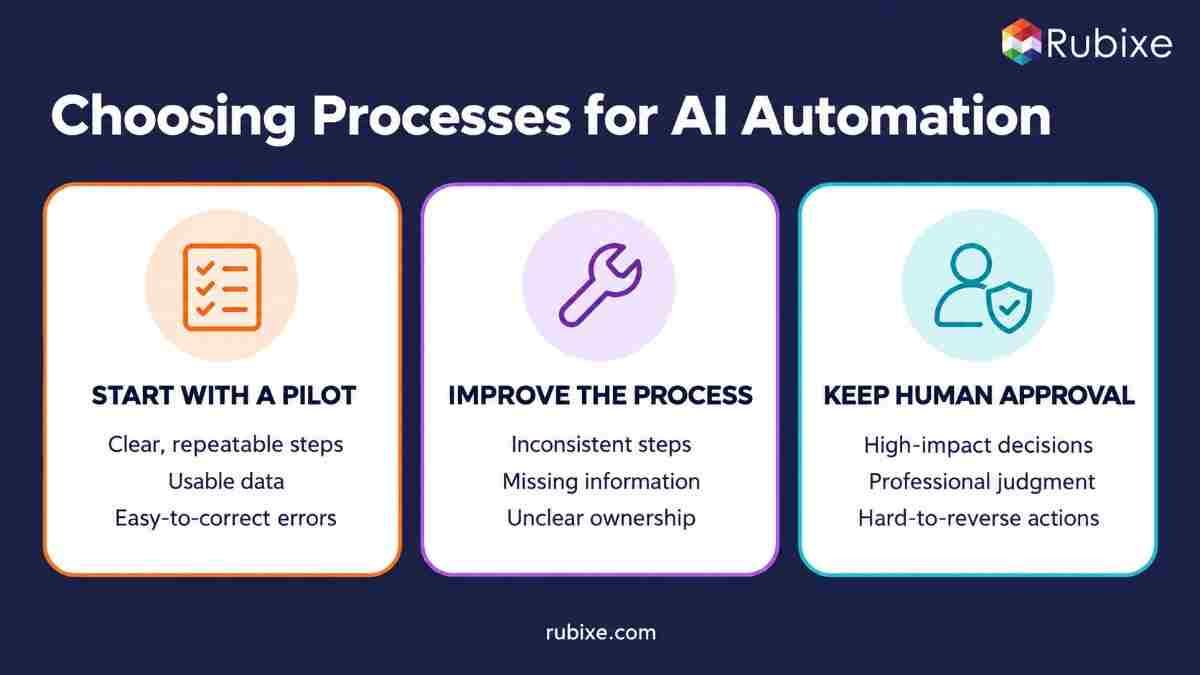
Assess three areas before selecting a process.
Business value: Frequent tasks, high volumes, and substantial manual effort create opportunities to reduce delays or release staff capacity.
Process readiness: Clear steps, consistent inputs, accessible data, and defined ownership make implementation easier. An AI readiness assessment can help identify wider gaps.
Risk and judgment: Consequences matter alongside accuracy. A misrouted ticket and an incorrect payment authorization require different controls.
Use the assessment to choose an approach:
-
Start with a pilot: The task is well documented, supported by usable data, and easy to inspect.
-
Improve the process first: Missing information, inconsistent steps, or unclear responsibilities need attention.
-
Keep human approval: Decisions involve substantial judgment or consequences that are difficult to reverse.
High volume alone is insufficient. A smaller process with clear ownership and manageable dependencies may provide a more useful first project.
Where Businesses Use AI Automation
|
Business function |
Possible workflow |
Human responsibility |
|
Customer service |
Classify tickets and recommend responses |
Handle sensitive cases and check response quality |
|
Sales |
Extract enquiry details and prepare CRM updates |
Confirm important customer information |
|
Finance |
Extract invoices and flag mismatches |
Approve payments and resolve discrepancies |
|
HR |
Organize application information and prepare onboarding records |
Review employment decisions and access requests |
|
IT operations |
Classify incidents and suggest routing |
Approve consequential system changes |
|
Manufacturing |
Use inspection or maintenance predictions to create review tasks |
Validate interventions affecting operations |
For AI applications in manufacturing, connect the prediction to an operational response. A maintenance alert might create a work order for review, with an engineer deciding when equipment should be taken offline.
How to Implement AI Automation
Start with a baseline and a named process owner. Record current volumes, completion times, staff effort, and error rates before changing the workflow.
A practical implementation sequence is
-
Define the outcome: Specify the business improvement and acceptable quality.
-
Map the process: Include exceptions, handoffs, and existing approvals.
-
Check data and access: Confirm availability, accuracy, and permitted use.
-
Choose the approach: Combine rules, RPA, or AI according to the task.
-
Build a limited pilot: Keep inputs, actions, and users within a defined scope.
-
Test: Include routine cases, difficult cases, and system failures.
-
Deploy gradually: Expand only when results support the change.
-
Review: Monitor performance and assign responsibility for updates.
Workflow redesign deserves attention during planning. Deloitte’s AI Pulse Check reported that 48% of respondents described AI adoption with workflows and roles left intact, while 12% reported redesign at scale. These are respondent reports from polling described as covering nearly 3,700 professionals.
Choosing AI Automation Tools or a Custom Solution
Existing AI automation tools can offer connectors and workflow components that reduce initial development work. Their suitability depends on the systems, controls, and processes they support.
Custom development provides more control over specific requirements, with additional engineering and maintenance responsibilities. A combined approach may use an existing platform alongside custom integrations.
Compare options on:
-
Supported applications and data formats.
-
Approval controls and access permissions.
-
Logging, testing, and recovery features.
-
Usage costs at expected volumes.
-
Maintenance needs and internal support capacity.
Evaluate the complete workflow, including human review.
What AI Automation Costs
Costs depend on scope, integration complexity, processing volume, and required controls.
|
Cost category |
Typical components |
|
Initial setup |
Process mapping, data preparation, development, and integration |
|
Operating costs |
Software subscriptions, model usage, hosting, and monitoring |
|
Human effort |
Review, corrections, training, and support |
|
Maintenance |
Testing updates, repairing connections, and adjusting workflows |
Estimate routine processing and exception handling separately. A workflow that repeatedly retries failed actions or sends many cases for correction can cost substantially more than its initial usage estimate.
How to Calculate AI Automation ROI
Use the same period for benefits and costs:
First-year ROI = ((First-year attributable benefit − First-year total cost) ÷ First-year total cost) × 100
Document how each benefit was valued. Time and cost savings from AI automation should distinguish staff capacity released from actual spending reductions.
Avoid counting the same saved hours under several benefit categories. Assign financial value to shorter cycle times only when the connection is defensible.
Track operating indicators alongside ROI: completion time, error rate, human review effort, cost per completed case, and straight-through processing. A high review rate may be appropriate for a sensitive workflow.
Common AI Automation Risks
Design for failures that affect the whole process:
-
Incorrect information: Generated content or extracted fields may be wrong.
-
Wrong actions: A valid-looking output may trigger an inappropriate update.
-
Prompt injection: External content may contain instructions intended to redirect the AI.
-
Excessive permissions: Broad access can increase the consequences of an error.
-
Changing inputs: New formats or business conditions may reduce performance.
-
Repeated execution: Retries can create duplicate actions or unexpected costs.
-
Broken integrations: Failed connections can interrupt or partially complete work.
-
Overreliance: Employees may accept outputs with insufficient review.
OWASP describes prompt injection as a risk arising when inputs alter model behavior in unintended ways. Treating external content as untrusted is one part of a wider set of controls.
How to Govern AI Automation
AI governance defines responsibility, permitted actions, and oversight.
A practical rollout approach is to begin with observation and recommendations, introduce approved actions, then consider independent execution for selected low-risk cases. The appropriate level depends on the workflow and its evidence.
Apply these controls:
-
Grant only the access required for each task.
-
Separate recommendations from consequential actions.
-
Use validation rules and tested thresholds for routing.
-
Require approval before sensitive or irreversible actions.
-
Record actions, approvals, failures, and corrections.
-
Set usage limits, retry limits, and stopping conditions.
-
Test misuse and integration failures.
-
Assign incident ownership and recovery procedures.
Treat model-reported confidence cautiously. Use evaluated performance and risk rules to decide which outputs need review.
NIST’s AI Risk Management Framework provides a broader reference for governing, mapping, measuring, and managing AI risks.
Frequently Asked Questions
Can small businesses use AI automation?
Yes. Existing tools can support limited workflows with manageable setup requirements. Choose a task with a clear benefit and account for subscriptions, integration, and review effort.
Does every workflow need an AI agent?
No. Fixed workflows can combine rules with AI classification or extraction. Agentic planning is useful when choosing the sequence of steps adds value.
Does AI automation require training a model?
Some workflows use existing models through applications or APIs. Others require customization. The decision depends on the task, data, evaluation results and operating requirements.
How long does implementation take?
Timing depends on scope, data readiness, integrations and testing. A limited pilot and a production deployment have different requirements, so agree on milestones after assessing the process.
Does AI automation replace employees?
Effects vary by organization and task. Automation can change responsibilities, staffing needs, and required skills. Plan training and role changes alongside the technical deployment.
How should success be assessed?
Compare costs, quality, and completion times with the baseline. Include human review and correction work, then determine whether the improvement justifies ongoing operation.
Conclusion
Start with a process your team understands, define the outcome, and test the complete workflow. Reliable data, appropriate permissions, and clear ownership help turn a useful pilot into an operation the business can maintain.
Rubixe brings together AI consulting, development, and system integration to build AI automation solutions around business workflows. Book a free consultation with our AI experts to identify where automation can add value in your enterprise.