


















Business Process Automation With AI: What Works in 2026
Discover how business process automation with AI reduces costs, minimizes errors, streamlines workflows, and boosts productivity across business operations.

Many businesses are adopting AI to improve efficiency and reduce operating costs. Yet repetitive tasks, delayed approvals, and manual errors continue to slow down daily operations. The result? Investing in AI does not always lead to better business performance.
The real challenge is turning AI adoption into measurable results, such as faster workflows, lower costs, improved productivity, and fewer errors.
This guide explains how business process automation with AI works, which processes offer the greatest benefits, and how businesses can use AI automation to improve efficiency and achieve better financial results.
What Is Business Process Automation With AI?
BPA uses software to run repetitive tasks. Think of form routing, report building, and data syncs. Older tools follow fixed rules. They work well until something unexpected shows up.
AI changes that. It reads documents, spots patterns, and makes smart calls. It also learns from new data.
Traditional BPA: Rule-based. Fast, but easy to break. A new invoice format can stop it.
AI-powered BPA: Adaptive. It handles messy inputs and improves over time. People review the tricky cases.
New to the topic? Start with our guide on what is AI automation.
Benefits of Business Process Automation With AI
AI automation pays off in four main ways. Each one ties back to a number you can track.
Faster processing: AI handles repeat steps in seconds. Invoices, tickets, and forms no longer wait in a queue. In McKinsey’s 2026 survey, eight in ten respondents say AI improved their own productivity.
Fewer errors: Software does not get tired or skip a step. It checks data the same way every time. That means less rework and fewer surprises in audits.
Lower operating costs: Automation cuts the hours your team spends on manual tasks.
Easier scaling: Software grows with your volume. You can handle more orders, chats, and invoices without hiring at the same pace.
To prove these gains, track the KPIs later in this guide.
Business Process Automation Stats for 2026
AI adoption is growing, but turning that adoption into measurable business value remains a challenge. These statistics highlight the opportunities and risks.
-
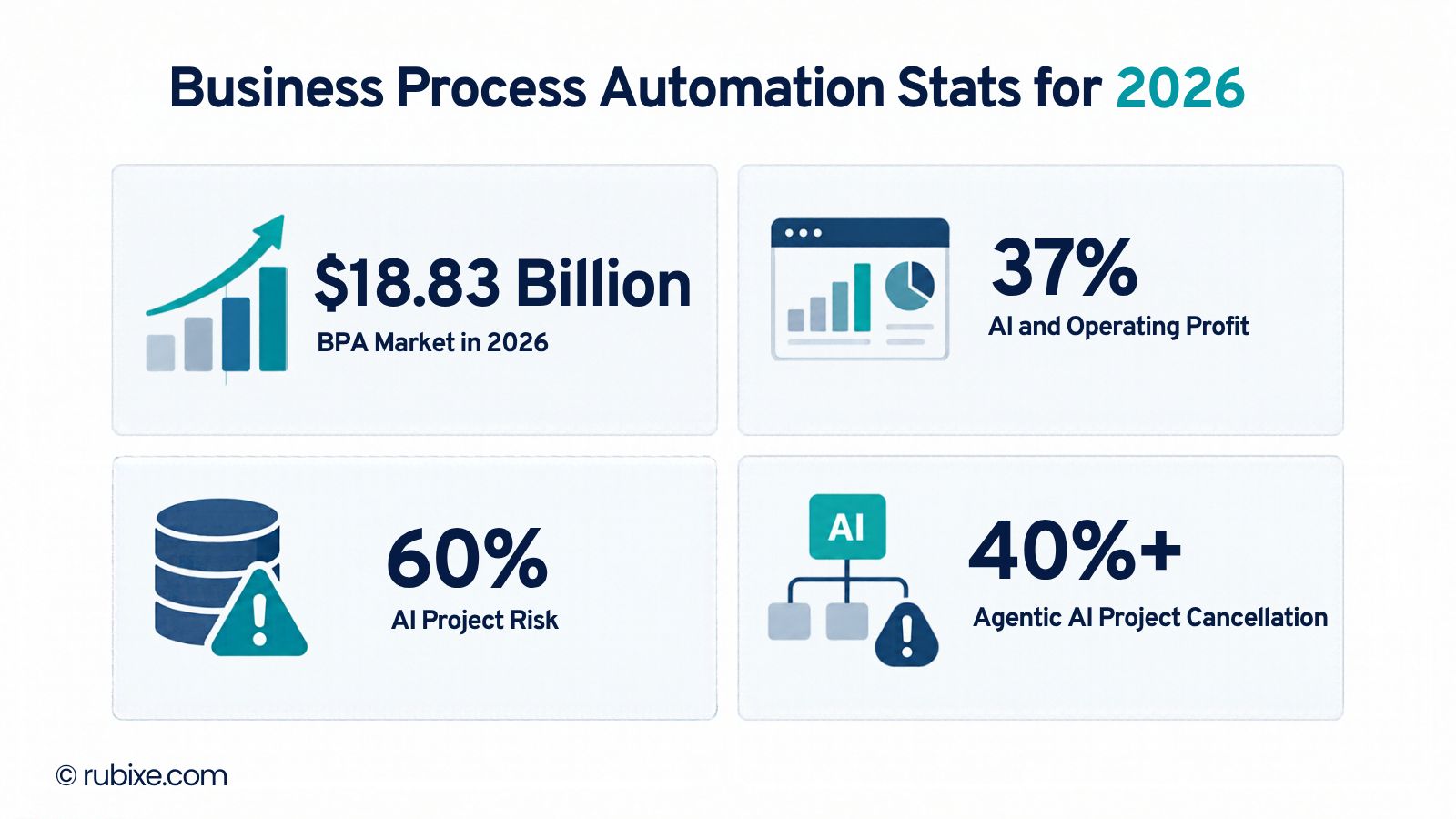
Market growth: The Business Research Company estimates that the business process automation market will grow from $16.32 billion in 2025 to $18.83 billion in 2026, reaching $33.43 billion by 2030. Market estimates vary by research firm and methodology.
-
AI adoption vs. business value: Although many organizations are using AI across business functions, adoption does not always translate into higher profits. Only 37% of surveyed respondents reported that AI had contributed to operating profit, while just 6% were classified as high performers based on AI's contribution to earnings. Businesses need clear objectives and measurable performance indicators to turn AI investments into financial returns.
-
Data readiness: An estimated 60% of AI projects that lack AI-ready data could be abandoned by the end of 2026. Inconsistent records, poor data quality, and disconnected systems can limit automation performance. Preparing reliable, accessible data is an essential step before implementing AI-powered workflows.
-
AI agent implementation risks: More than 40% of agentic AI projects could be canceled by the end of 2027. Unclear business goals, rising implementation costs, and inadequate risk controls can prevent projects from delivering value. Organizations should begin with well-defined use cases, establish clear success metrics, and introduce appropriate human oversight before expanding AI agent deployments.
-
AI agent risks: Gartner forecasts that more than 40% of agentic AI projects could be canceled by the end of 2027. Clear business objectives, realistic cost estimates, and appropriate risk controls are essential before scaling AI agents.
The takeaway is clear: successful automation depends on more than adopting AI. Businesses need reliable data, well-designed workflows, and measurable performance targets.
Where AI Automation Pays Off First
Start where work is high in volume and heavy on rules. These five areas give quick wins.
Finance and accounting: AI reads invoices, pulls the data, and flags duplicates. It then routes each invoice for approval. Payments go out faster, with fewer late fees. A Gartner survey found that 59% of finance leaders already use AI in their finance function.
Customer service: AI answers common questions at once. It passes hard cases to a human agent with the full chat history. Gartner predicts agentic AI will resolve 80% of common service issues on its own by 2029.
Human resources: AI parses resumes, ranks candidates, and runs onboarding steps. Hiring moves faster.
Supply chain: AI forecasts demand and moves stock to where it sells. You avoid stock-outs and cut storage costs.
IT operations: AI sorts incoming tickets and fixes common faults on its own. Repair times drop. In security work, IBM’s 2026 breach study found that teams using AI and automation extensively saved an average of $1.93 million per breach.
Want more ideas? Read how AI solutions reduce manual work
Comparing tools? See our top 15 AI automation tools.
What AI Agents Change in 2026
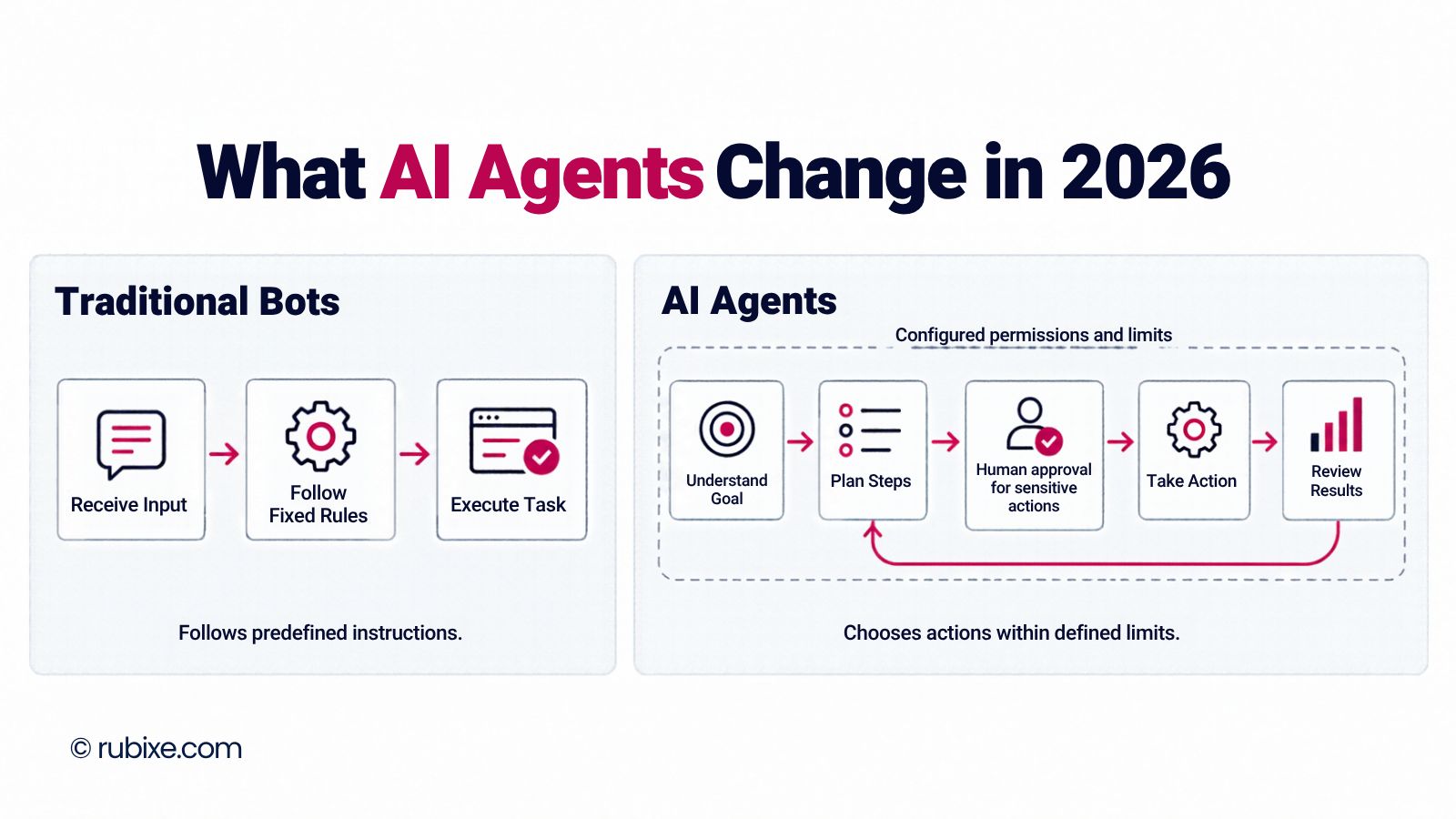
An AI agent plans steps and acts on its own, within limits you set. A basic bot follows a script. An agent can pick the next move.
Most firms scale agents first in IT, knowledge management, and software engineering.
But be careful with vendor claims. Gartner estimates only about 130 of the thousands of agentic AI vendors are real. Many vendors rebrand chatbots and old RPA tools as agents, a habit Gartner calls agent washing.
Our advice is simple. Gartner says to use agents only where they bring clear value or return on investment. Start with one narrow, repeatable task. Keep a human in the loop. Grow after you see proof.
Why Many Automation Projects Fail
Most failures trace back to a few causes.
Weak data: A Gartner survey found that 63% of organizations lack confidence in their data practices for AI. Messy data gives messy results.
Old processes, new tools: Nearly three in four high performers fundamentally redesigned their workflows because of AI. Only one in four other firms did. AI on top of a broken process just speeds up the mess.
Unclear value: Gartner links canceled agent projects to rising costs, unclear business value, and weak risk controls.
A Simple Roadmap From Pilot to Scale
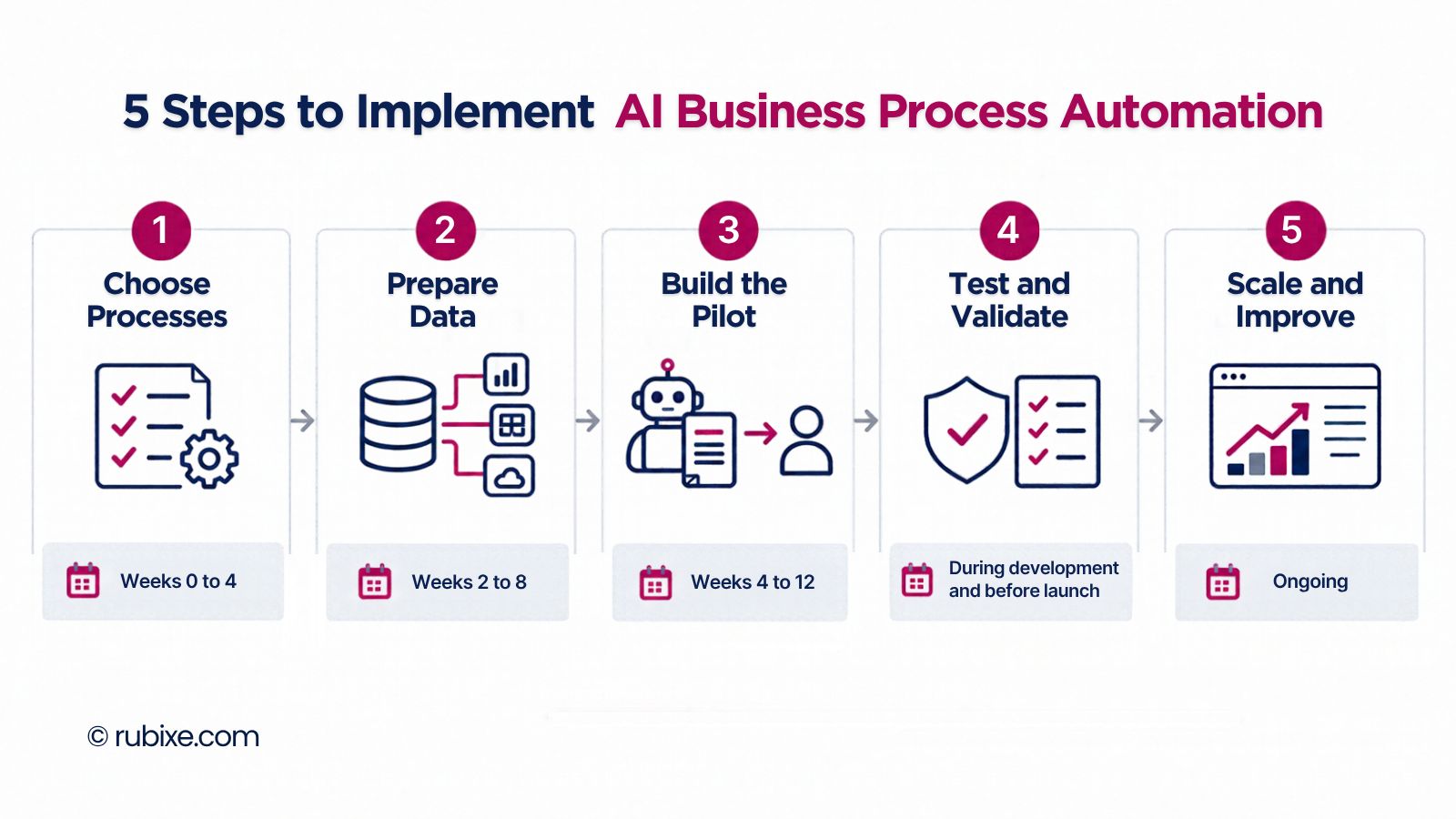
Follow five phases. The timelines are typical ranges, not promises.
1. Pick the right processes (weeks 0 to 4). Map your key processes. Score each one on volume, error rate, and return. Choose one to three for a pilot.
2. Prepare data and connections (weeks 2 to 8). Audit data quality and access. Connect your ERP, CRM, and document stores. Set basic data rules.
3. Build the pilot (weeks 4 to 12). Use RPA bots for rule-based steps. Use AI models for decisions. Send exceptions to a person. Record your baseline numbers first.
4. Test and check compliance (weeks 2 to 6). Test the full flow from start to finish. Run security, bias, and legal checks. Keep logs that explain each AI decision.
5. Scale and improve (ongoing). Reuse parts across teams. Watch performance. Retrain models as data changes.
Need a framework? See our AI adoption framework.
Manage Risk, Security, and Rules
AI adds new risks. Treat governance as part of the build, not a last step.
Front-line staff feel the strain first. In McKinsey’s survey, 47% of mid-level managers and individual contributors report a negative effect from AI at work, compared with 31% of executives and senior managers. Plan for that from day one.
-
Access and privacy: Limit who sees what. Encrypt data at rest and in transit. Set clear retention rules.
-
Explainability: Log each AI decision in plain language.
-
Bias checks: Test models before launch, then on a schedule.
-
Audit trails: Keep tamper-proof records of every automated action.
-
Fail-safes: Define rollback steps and alerts. High performers also work harder to stop unauthorized or unintended AI actions.
Want an expert review? Our AI readiness audit covers data, systems, and risk.
KPIs to Track
Measure before and after. Set a baseline in week one.
-
Cycle time: how long a process takes.
-
Error rate: mistakes per 100 tasks.
-
Cost per transaction: labor and tool cost for each task.
-
Throughput: tasks done without extra hires.
-
CSAT and NPS: customer happiness scores.
-
Compliance exceptions: how often rules are missed, and how fast you fix them.
Tie each KPI to money. Leaders fund what they can see.
Manual vs. AI-Powered Processes
|
Area |
Manual process |
AI-powered BPA |
|
Speed |
Slow, with long waits |
Fast and steady |
|
Errors |
Common |
Fewer, and caught early |
|
Reporting |
Late and static |
Real-time dashboards |
|
Scaling |
Needs more hires |
Grows with software |
|
Audits |
Hard to trace |
Clear logs and explanations |
|
Service |
Slow replies |
Faster, steadier replies |
Quick Readiness Checklist
Check these boxes before you launch a pilot.
-
Process maps show volume and error rates.
-
Data sources are listed and checked for quality.
-
Links to ERP, CRM, and file systems are mapped.
-
Privacy and compliance rules are approved.
-
Pilot KPIs are set, and baselines are measured.
-
Human review rules and escalation paths are clear.
-
A plan exists for monitoring and retraining.
-
Access controls and encryption are in place.
A Real-World Example
Klarna reported that its AI assistant handled two-thirds of its customer chats. That moved a large share of repeat work off human teams. Read our Klarna case study for the details.
Your results will vary.
Frequently Asked Questions
What is business process automation with AI?
It is software that runs business tasks and learns from data. It handles messy inputs that fixed-rule tools miss.
How long does a pilot take?
Most pilots take 4 to 12 weeks. Data readiness is the main factor.
Is BPA only for large companies?
No. Cloud tools let small teams automate one process at a time. Email sorting and invoice capture are common starting points.
What is the difference between RPA and AI automation?
RPA follows fixed rules. AI automation adds learning and judgment. Many firms use both. Learn more about Robotic Process Automation.
AI automation works when you pick the right process, clean your data, and track results. Start small, prove the value, then scale.
Rubixe has delivered 50+ AI automation projects across industries. Our team guides you from planning to full rollout. Explore our AI automation services to get started.